Buy a bandwidth plan
Residential, Mobile, Premium Residential or Datacenter — priced per GB. Create an account or buy in your dashboard.
New In the PinkProxies Android app
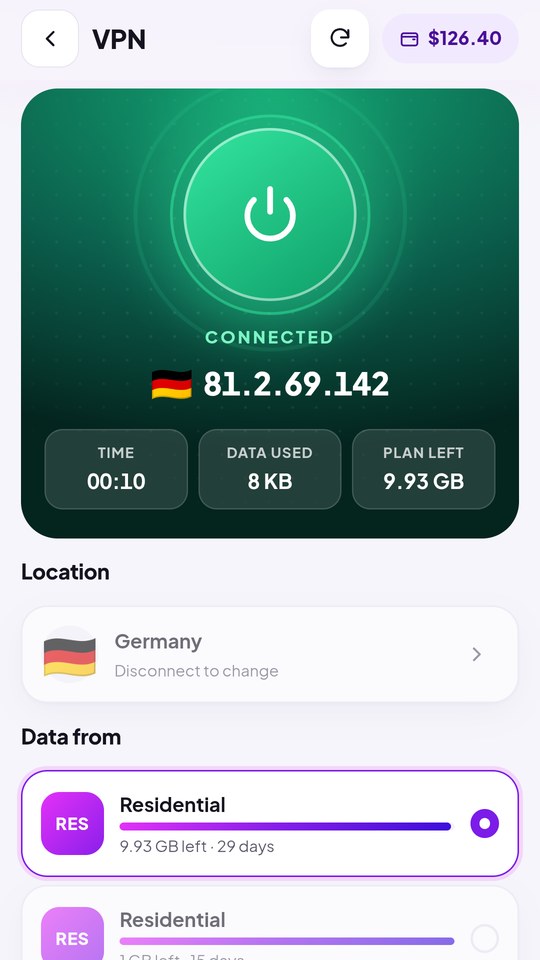
One tap sends your whole phone’s traffic through a real residential or mobile IP in the country you pick. It runs on your PinkProxies bandwidth plan — pay per GB, no separate VPN subscription.
Android only for now — no iPhone version yet.
How it works
No proxy settings to type in. The app sets everything up from the plan you already own.
Residential, Mobile, Premium Residential or Datacenter — priced per GB. Create an account or buy in your dashboard.
Install or update PinkProxies from Google Play and sign in with the same account.
Open VPN in the app, choose which plan to use and the country you want to appear from.
Allow Android’s VPN permission once. Your whole phone now goes out through a real IP in that country.
See it in action
A real recording from an Android phone: Pakistan IP before, a US residential IP after. Tap a step to jump to it.
Why it’s different
Instead of a shared VPN server, you connect through the same residential and mobile IPs our proxy customers use — in the country you choose.
Every app and browser on the phone goes through the tunnel — no per-app proxy settings.
Appear from a real home or mobile-carrier connection in the country you pick, not a flagged VPN server.
Data comes from your plan’s GB. No separate VPN subscription to manage.
Traffic is encrypted (TLS) from your phone to our relay, and while connected it can’t slip around the tunnel.
A status notification shows data used in real time, with a Disconnect button.
Connect or disconnect from the Android Quick Settings panel without opening the app.
Plans
Any of these bandwidth plans works with the VPN. The data you use while connected comes from the plan you pick.
Residential
$0.80/GB
Real home IPs. The everyday choice for seeing sites as a local.
Get ResidentialMobile
$2.00/GB
Real 4G/5G mobile-carrier IPs.
Get MobilePremium Residential
$0.80/GB
Premium home IPs with country targeting.
Get Premium ResidentialDatacenter
$0.50/GB
Fast and the lowest cost per GB.
Get DatacenterWebsite prices per GB. The same plan, account and balance work on the website and in the app.
Use cases
See sites, prices and search results the way people in another country see them.
Verify ads, landing pages and geo rules from the right country.
Run accounts from a residential IP instead of a datacenter or VPN address.
Check how your app or site behaves for users in each market.
Encrypt your phone’s traffic to our relay on café, hotel and airport Wi‑Fi.
Good to know
Straight answers before you buy, so there are no surprises.
FAQ
It is a VPN built into the PinkProxies Android app. Instead of a shared VPN server, your phone’s traffic goes out through a real residential or mobile IP in the country you choose, using one of your PinkProxies bandwidth plans.
No. The VPN uses the bandwidth plan you already have. Data you use while connected is taken from that plan’s GB, the same as using the proxies any other way.
Bandwidth plans priced per GB: Residential, Mobile, Premium Residential and Datacenter. Pick the plan in the app before you connect.
Buy a bandwidth plan, install or update the PinkProxies app from Google Play, sign in with the same account, open VPN, choose your plan and a country, tap Connect and allow Android’s VPN permission.
Yes. Traffic is encrypted with TLS from your phone to our relay. While you are connected, traffic does not leak around the tunnel.
Proxies carry TCP traffic only, not UDP. Websites and most apps work normally, but voice and video calls and online games need UDP, so they won’t work while the VPN is connected.
It depends on what you do. Browsing and social apps use little; video streaming uses GB quickly. The status notification shows the data used live, so you can keep an eye on it.
Almost all do. A few sites, such as some TV, streaming and banking services, block proxy networks or are blocked on them. Try another country, or disconnect while you use that site.
One tap: use Disconnect in the app, the Disconnect button in the notification, or the Quick Settings tile.
Not yet. The VPN is available in the Android app only.
Ready when you are
Buy a plan, install the app, tap Connect.

Take your online performance to the next level with PinkProxies. Whether you’re managing straightforward tasks or tackling advanced projects, our proxies deliver unmatched reliability and success.